
Last updated on
Oct 31, 2026
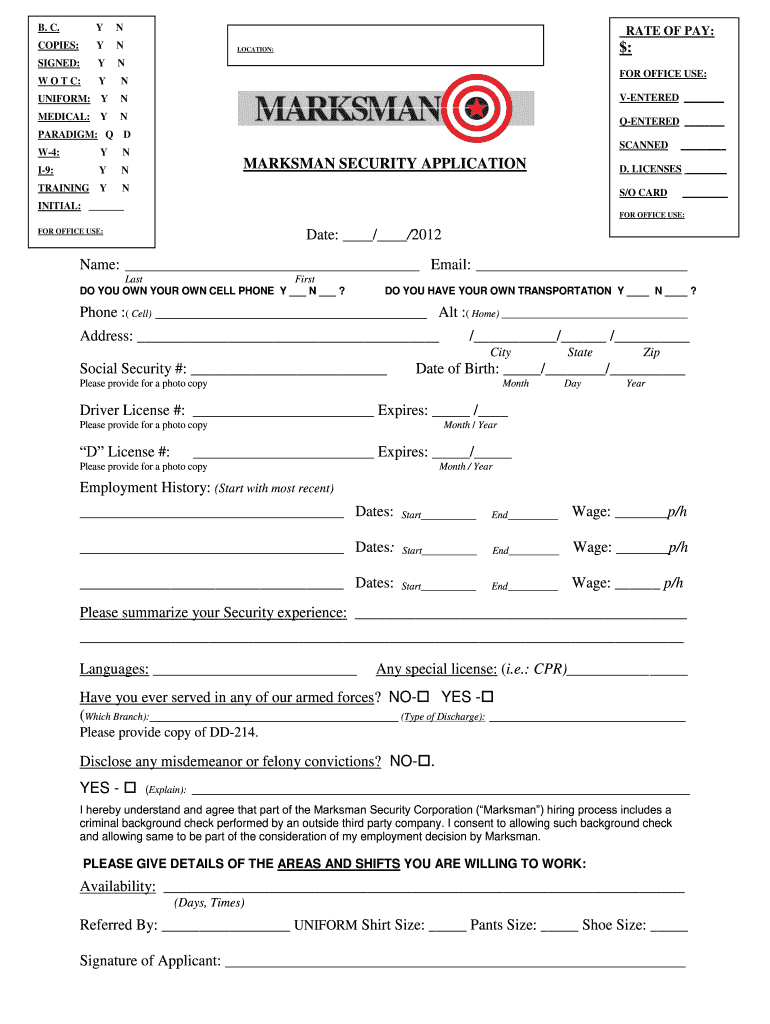
Marksman Security Application Form 2012-2026 free printable template
We are not affiliated with any brand or entity on this form

Fill out
Complete the form online in a simple drag-and-drop editor.

eSign
Add your legally binding signature or send the form for signing.

Share
Share the form via a link, letting anyone fill it out from any device.

Export
Download, print, email, or move the form to your cloud storage.
Why pdfFiller is the best tool for your documents and forms


End-to-end document management
From editing and signing to collaboration and tracking, pdfFiller has everything you need to get your documents done quickly and efficiently.
Accessible from anywhere
pdfFiller is fully cloud-based. This means you can edit, sign, and share documents from anywhere using your computer, smartphone, or tablet.
Secure and compliant
pdfFiller lets you securely manage documents following global laws like ESIGN, CCPA, and GDPR. It's also HIPAA and SOC 2 compliant.
What is Marksman Security Application Form
The Marksman Security Application Form is an employment application used by individuals applying for security positions at Marksman Security Corporation.
pdfFiller scores top ratings on review platforms




It has worked well so far. I did recommend a friend that was wondering if he should renew his docusign.
Find forms by description only. Has forms that my more expensive service does not offer.
Who needs Marksman Security Application Form?
Explore how professionals across industries use pdfFiller.

Marksman Security Application Form is needed by:
-
Job seekers interested in security roles
-
Individuals applying for positions at Marksman Security Corporation
-
Human resources personnel involved in hiring
-
Recruiters for security jobs
-
Employers needing a structured application process
-
Candidates with prior security experience
Comprehensive Guide to Marksman Security Application Form
What is the Marksman Security Application Form?
The Marksman Security Application Form is a pivotal component in the job application process for security positions at Marksman Security Corporation. This form collects essential information from applicants, including their identification and personal details. It serves as a foundational document, streamlining the hiring process for both the applicants and the organization.
Applicants must provide their personal information, including name, contact details, and necessary identification to ensure eligibility for various roles within the company. This form also helps maintain accurate records during the hiring process.
Purpose and Benefits of the Marksman Security Application Form
This form is vital for applicants aspiring to secure employment in the security field. It simplifies the application process, making it more accessible and efficient. Utilizing the Marksman Security Application Form ensures that all relevant information is collected uniformly, which is beneficial for conducting thorough background checks.
By using this form, candidates can confidently submit their applications knowing that it meets the standard requirements necessary for processing potential employment with Marksman Security Corporation.
Key Features of the Marksman Security Application Form
The application form includes several key sections that collect important information from applicants. These sections provide details about personal information, employment history, and prior security experience. Each part of the form is designed to facilitate the easy gathering of relevant data for the hiring team.
Moreover, the form requires candidates to consent to background checks, underscoring its significance in the hiring process. Additionally, there are fields intended for office use, which help streamline processing of applications and enhance overall efficiency.
Who Needs the Marksman Security Application Form?
This application form is necessary for a variety of individuals seeking roles within Marksman Security. Potential applicants may include those looking to fill positions such as security guards, supervisors, and other roles within the security sector. Understanding the target audience for this form is key to ensuring that the right candidates apply for the respective positions.
The application is essential for anyone pursuing a career in security, as it delineates the specific information required for consideration by the hiring team.
How to Fill Out the Marksman Security Application Form Online (Step-by-Step)
-
Access the Marksman Security Application Form using pdfFiller.
-
Prepare the necessary information, including personal details and employment history, prior to starting the application.
-
Fill in each section of the form, ensuring accuracy in fields such as emergency contacts and availability.
-
Review entries thoroughly to avoid any inaccuracies before final submission.
-
Submit the completed form electronically through pdfFiller.
Common Errors and How to Avoid Them When Completing the Application
Applicants frequently make common mistakes while filling out the Marksman Security Application Form, which can lead to delays or rejection of their applications. Such errors may include providing incorrect information or omitting necessary details.
To minimize these issues, it is advisable to double-check all entries. Ensuring that all required fields are filled out clearly and legibly greatly increases the chances of successful application processing.
How to Sign the Marksman Security Application Form
Signing the application form is a key requirement that verifies the authenticity of the submission. Applicants can utilize both digital and wet signatures when completing the form. There are various tools available on pdfFiller that can assist users in easily signing the document.
Moreover, understanding the legal implications of the signature is crucial, as it confirms the applicant's agreement to the terms outlined in the form.
Submission Methods for the Marksman Security Application Form
After completing the Marksman Security Application Form, applicants have multiple submission methods available. They can submit their application online, in person, or via email, providing flexibility depending on their circumstances.
It is important for applicants to track their application status post-submission to stay informed about any follow-ups or interview scheduling from Marksman Security Corporation.
What Happens After You Submit the Marksman Security Application Form
Once the application is submitted, it undergoes a review process. This phase may involve scheduling interviews and conducting further evaluations. Applicants should remain prepared for follow-up communications, as timing of responses may vary.
Regardless of the timeline, candidates should maintain an active line of communication to ensure they stay engaged with the hiring process.
Maximize Your Chances with the Marksman Security Application Form Using pdfFiller
Applicants are encouraged to leverage pdfFiller's tools to enhance their application experience. This cloud-based editor offers functionalities for quick editing, filling, and signing, making the application process smoother.
Additionally, pdfFiller ensures security standards for handling sensitive applicant information, giving users peace of mind while submitting their applications.
How to fill out the Marksman Security Application Form
-
1.Access the Marksman Security Application Form on pdfFiller by visiting their website and using the search function to locate the form.
-
2.Once you find the form, click on it to open it in the pdfFiller editor, where you can start filling out the required information.
-
3.Before beginning to fill out the form, gather your personal information, including your full name, contact details, employment history, and any relevant security experience.
-
4.Begin filling in your personal information in the designated fields, ensuring accuracy and completeness.
-
5.Use the checkboxes provided to indicate your availability and any relevant qualifications related to security positions.
-
6.After completing your information, make sure to read the instructions provided for any signature requirements, and sign the form digitally using pdfFiller's signature tool.
-
7.Review the completed application thoroughly, checking all fields for accuracy and completeness before finalizing the document.
-
8.Once you are satisfied, you can save the form directly to your computer, download it in your preferred format, or submit it electronically through pdfFiller's submission options.

What are the eligibility requirements for the Marksman Security Application Form?
Eligibility requirements typically include being of legal working age and having relevant experience or qualifications for the security job you are applying for. Ensure to gather any necessary certifications beforehand.
How do I submit the application once completed?
You can submit the completed Marksman Security Application Form via pdfFiller by electronically submitting it through their platform. Alternatively, you can download and email it to the HR department at Marksman Security.
Are there any deadlines for submitting the application?
While specific deadlines may not be mentioned, it is advisable to submit your application as soon as possible to increase your chances of being considered for available positions.
What supporting documents do I need to include?
Typically, you may need to include identification documents, certifications related to security, and possibly references. Check with Marksman Security for specific documentation requirements.
What common mistakes should I avoid when filling out the form?
Common mistakes include providing inaccurate information, omitting required fields, and forgetting to sign the application. Always double-check your entries before submitting.
How long does it take to process the application?
Processing times can vary, but applicants can typically expect to hear back within a few weeks. It may depend on the volume of applications received and the specific hiring process in place.
Can I update my application after submission?
If you need to make updates, contact the HR department at Marksman Security directly to inquire about their policy on amendments to submitted applications.
Related Content
Related Forms




Related Catalogs
Get the latest insights from our blog


If you believe that this page should be taken down, please follow our DMCA take down process
here
.
This form may include fields for payment information. Data entered in these fields is not covered by PCI DSS compliance.